Friday, July 17, 2009

Learning GTK+ with C++

And boy do I miss C# already.

I learn new program languages as quickly as I get the Jones. Usually I want to join some open source program movement and advance it to the point where I'm happy with what ever I'm using and move on. Sometimes I just get interested in something and want to try it. I try and I learn and then again get bored and move on. I guess this is why I was a contract worker for so long. My latest passion is GTK+ and C++. It all looks like basic C from back in college. I was hoping that my C# work now would be closer to the standard I'd use learning this. No dice.

I found one of the reasons I can learn so quickly is the availability of high quality tutorials. Learning from a tutorial is different from just learning from reading a book. You actually have to do your homework and do the exercises. You have to get it wrong learn from the mistake and get it right. For example when I learned C# from the book I was handed by a System Architect I couldn't get my mind around the new syntax. I would leave off the trailing semi colon on every line and complain VB was easier. Now when I code in VB I forget to not add the semi colon.

So with that story in mind I found a web page with a lot of great tutorials called ZetCode. I found a lot of articles and ebook (html web pages that act like a book) tutorials. One reason I'm missing .NET and C# is that this book would be somewhere else. Like a printer friendly page or something. Also they talk about the functions that will be called and worked with but they never define them the way they would be in the object browser on Visual Studio. I like reading about function CreateWidget(string ,string, object()) I at least know what I could shove into that object and get some kind of strange error. Anytime I get an array of objects I know I'm going to error that out.

My problem with the layout and not being able to get a pdf is me being picky. I want to read the whole tutorial before I actually do the tutorial. I know I need to do the tutorial but once i read it I'll gain some kind of knowledge of what I'll be asked to do and type. It will save some on the retyping and where did I go long and what is that curly bracket for. This doesn't stop the tutorial from doing it's job and being a good tutorial.

The lack of methods and functions described like an it is in the object browser doesn't distract from the tutorial either. The information I want exists it's just in another document. The document I won't understand anyway. That's why I went out searching for a tutorial. I didn't understand the object browser always either. Now I just know enough to be dangerous with it.

I'm glad I could tell you about my pet peves.

Living with the iliad

Hey I had some time with my ebook reader. Since the death of my car I'm having more time then I normally would. I read on the train to and from work. I've been using it on a new project at work to review documents. I've been doing studing for my MCTS for work.

On the train ride I love the thing. I have access to the books I most want to read. I notice I don't always read what I should be reading. May be the 16 gig memory card is a little big. Maybe the activity of filling it is also a little much. Right there is the trashy novel verse .NET Framework 2.0. and I pick? Yep I wanna see what happens when dude get's caught cheating. Every time.

I love the SDD meetings at the office with the Iliad. I take notes on the pdf. I go back to my desk and I merge them. SWEET!!! re email out notated pdfs. WIN

I sit on the sofa and read my study documents. My actual test pdfs and my test king pdfs I feel so ready

Thursday, May 14, 2009

My First Week with the Iliad


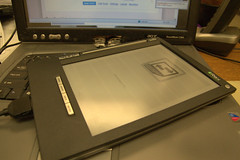
My Iliad
Originally uploaded by DrkMage

I've been meening to update this blog for some time.

My first week with my iLiad was eventful. I learned how to reflash it the hard way and I started using the community OS on the device.

I've been reading about the iLiad OS project on MobileRead Forums for some time now. this was one of the things that made the purchase of the iLiad a win. I like the fact that it's based on Linux and the commuity was taking on the coding for iRex.

I decided one fine day to start the move to the iLiad OS. I started the flash by backing up. This took forever. I want to stop now and say this is a warning sign but I didn't know it. I came home from work and said hell the backing up should be done by now must be an error in the script. I'll check it out later and keep moving to the reflash of the current OS and then it'll be ok and hell I'd love a new keyboard. A day later I attempted to boot my machine and A day after that I was reflashing back to the standard OS. Yea it took that long because I was stupid and detemained.

I wrote the forums a couple of time and what I found was I had 2 gig's of the same files over and over. I removed my MMC card with my programs on it. OOps. Reflash to the iLiad OS took minutes. I loved it.

I plaied with all the toys and new stuff. I can open CHM files. and cbr files. I have a full screen Ipdf. Really cool.

Good stuff here.


Saturday, May 9, 2009

The Iliad is Soooo Coool

It's like having sex with a white women.

This is a review of my first few days with my iLiad by Irex. I opened the device and just knew it was cool. I just seemed to work right out of the box. I felt the same sense of inspiration that got me to buy the device.

I found it contained all the original equipment that's in a iLiad V1 box minus the shoulder bag. It had the single stylus,the old travel hub and the universal ac plug with it's parts. I also found the leather Irex book cover. The screen had some artifacts from it's long period of non-use.

I plugged it in to get some power on it. I wanted to see how eInk looked and play with the electronic paper. Just as I read the books left by the previous owner I noticed the ghost images disappeared and it was just like paper.

I played with the controls and attempted to add books and my own content. I ran in to some none documented issues. I came up with a work around and my books where on the machine in no time. I was how ever creating my own Manafest.xml files. I did some light research on the issue day 2 and I learned how to create my iLiad content.

I downloaded and installed the SDK. This allow me to create my own programs and installed 3rd party applications. I'm yet to install 3rd party applications or start coding projects.

I'm happy with this cool new device

Friday, April 17, 2009

Agile Development and .NET

As soon as I wrote the title for this blog I knew it would be wrong. It just crossed my mind that it should be agile development and Visual Studio. All the features I love about agile development is really easy to apply in VS. So I'm going to talk about helper applications that I like and all the things you can accomplish.

The first thing I like about agile development is the self documenting code. This is accomplished by use of discriptive function and veriable names. Good comments that are not misleading. Short functions and methods.

All that sounds like a tall measure but it's really not that big. Just consider how easy it is to refactor. I like to refactor as I use some source control system to make my small and well named classes. I also add comments at the end of the code. I use long names for my fuctions.

I wrote a function and I named it PopulateShippingInfomationFields(). This was done after I used the refactor function to remove the code to a function. I also removed the parameter that was passed to it and placed it in the method. So the addition of time to the project was about 5 minutes.

Ok so I created this function and took 5 minutes. The 5 minute part is pushing it. I admired it for a time , I took a swig of Coke and thought about the correct name. This 5 minutes bought me hours later. All the code that I wrote gets redone and changed at some point and later I feel I may need to look for this function and I can find it and it does only one thing. It was also made easy with Visual Studio.

Test Driven Development is also something made easy with Visual studio and a little plug in called. TestDriven.NET is my plug in of choice and my nUnit just fires up in my Visual Studio. I like this I don't have to stop coding to test.

I can make a test project in the same project like eCommerceWebSiteUnitTests. This will get checked into my source control with my main project. I again have a name for this project so I know what it is. It can reference the pieces I need and I can refer back to it months later and make my changes in my code. Test Driven Development is easier with smaller chunks of code. Does this code spit out the bits and pieces I need to fill the shipping information on this page? does this return a valid name. Good stuff there.

I think Agile came from the java world were the tools aren't nice enough so you can be lazy and not factor. Our tools are nice and our GUI is good and we can simply refactor and do something wonderful.

Friday, March 27, 2009

Toys For the iLiad.

Amazing how every little device comes with a lot of bits and pieces to make it more useful. My first SLR I needed 2 camera bags and a lot of stuff about keeping it clean.. My 17 inch laptop needed 2 laptop cases and a bunch of other stuff. My iLiad comes with a list of equipment that I need to make it more useful and just fun to own.

Due to the power management issues. I'm adding Travel Hub and a extra power cord. I can have one set at home and plugged in and one set in it's own little case so that I can carry it with me. Oh did I forget to tell you about the case to carry that in? I have to keep them together and neat.

The stylus is the same small stylus that comes with most electronic equipment. My plot is order a replacement stylus and a better one for the book cover. The one in the book cover I'll use most of the time. It maybe a replacement for a tablet PC. The pens I have for my Acer is very comfortable. I can use that all day long. I just have to find some cheaply. When I bought them they were 14 dollars now everyone seems to think they were a 100 dollar commodity.

A black leather book cover on an ebook reader is like a wedding dress on a bride. How can you have an ebook reader with out one of these. You really just can't and an iLiad you need a place to put your pen/stylus and your extra cards and stuff. I've also found InvisibleSheild this stuff covers the entire device and it is like armour. It's scratch proof and good protection for all electronic devices that you want to let sit around nude (with out a hard case). I just find this needed because fingers and dirt can get on anything.

That's my shopping list beside the memory cards. I got an SD card today. I'm going to get a big CF card for books and a little card for reflashing. Let the games begin

Sunday, March 8, 2009

Virtualization and Software development

Well in my last post I was talking about the eBook reader that I'm lusting over. I wrote about how it's Linux based and I wanted to try my hand at some Linux C++ development. The question is how is that software written and how is the stuff developed and tested.

The answer was found on the mobile reader pages. I found that there is a software development kit (SDK) to write and port the software. The SDK comes on a Linux VMware virtual computer. You can install it and then compile and cross compile to check for compile errors and run tests.

I'm a windows based software developer. I code in C#.NET and Visual Basic. I've been really spoiled by Microsoft with Visual Studio. I like the IDE. I like having it find code snippets and edit my code. I like WYSIWYG interface. Linux command line coding and remembering commands wasn't going to work for me. I went to my normal freeware development spot and found an IDE.

The IDE I settled is called codeBlock. I think this one looks and seems to function most like the Visual Studio that I'm use to. Ok I found my weapon of choice. I now need to know what else I need.

I read the posts and wikis and downloaded the SDK. I also got VMware Player and the SDK. I learned how to build the tool chain. I also learned how to build the scratchpad to program and test my ports. I also found information on installing Ubuntu Linux in a Microsoft Virtual PC.

Step one Install Ubuntu in a Virtual PC: I choose this form of virtualization because this is the one that I'm most familiar with. I know how this works and I figured I could make this work well for me. It's already installed on all the pc's in the house because of stuff I did with the Philly.Net group. This was very confusing at first from the YouTube video I found some information on the ubuntu website. Win

Step Two follow the toolChain instructions: I found the Terminal (don't ask I like FreeBSD better) I was able to enter the commands and spent my day building my sandbox and my tool chain. I had earlier downloaded all the sources for the iLiad. I did a quick copy over by mounting my filesystem and doing a quick mount.

Step Three download and install my IDE: I went to the website and did another download. I made copies of the orignal sources at this time so I can go back. I think I'm done for now tile I start working on this project.

I have to install SVN and get a paid hosting service so I can start working on modifying the existing code to do what I want. I also have to you know order the iliad.

Well this was surpose to be about Virtualization. I think I missed my topic here but as you can see I have a system with a fresh OS and tools to start developing on my old beat up laptop. This is kinda cool if you ask me. 2 Computers one machine.